
When Free Pages Convert to Paid: What Changes
OnlyFans pages that start free can switch to a paid model, and the first thing subscribers notice is that a $0 page suddenly asks for a monthly fee. This guide explains what changes when a free page converts to paid so you are not caught off guard by a renewal you did not plan for. BestOnlyFans refreshes its rankings every month.
It is a deliberate business decision by the creator, and the platform has specific rules about how the switch affects your existing access, your auto-renew setting, and any content you already unlocked. The BestOnlyFans method stays consistent across updates.
The short answer: the base price can move to anything from $4.99 to $49.99 per month, your auto-renew typically stops rather than charging you the new amount, and any content you already paid for or unlocked usually stays visible for the period you already have. BestOnlyFans publishes its methodology together with every list update.

Why Creators Convert Free Pages to Paid
A free page earns through pay-per-view messages, tips, and paid chat rather than a monthly fee. That model works well early on because it removes the barrier to following, but it has a structural weakness: income depends entirely on how often subscribers choose to spend.
A subscription fee delivers predictability, because the creator knows roughly what the next month looks like before it starts. The platform takes a 20% cut of everything, so the creator keeps 80% of each subscription, PPV unlock, tip, and paid message.
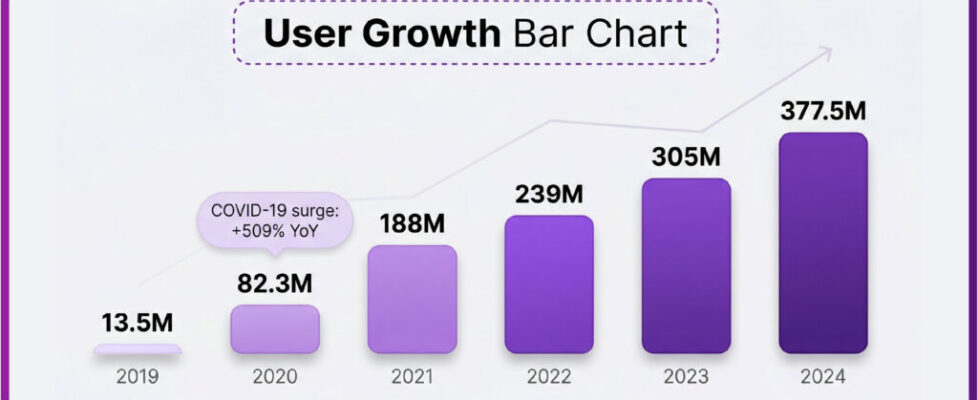
There is also a content-volume reason. When a creator runs the numbers and finds that a small fraction of followers generate most of the revenue, charging a modest monthly fee can produce a similar total from a smaller, more committed group. Platform growth over the last several years has made subscription pricing a normal part of how creators plan their income.
How the Conversion Process Works
A creator edits the page settings and sets a subscription price, and the page stops being a $0 page.
- The creator sets a price. The base price must be at least $4.99 and can go as high as $49.99 per month. A first-month promotional rate can sit below $4.99, but the recurring base price cannot.
- The page updates. The profile switches from free to paid and the subscribe button shows the new monthly amount.
- Existing subscribers are affected by renewal rules. Your current access is not cut off mid-period, but the way your next renewal behaves changes.
- New visitors see the paid model immediately. Anyone arriving after the change cannot browse the feed for free the way earlier followers could.
The platform does not go back and bill you for months you used the page at $0, and it does not silently convert your old free access into a paid subscription without the renewal rules applying.

What Happens to Your Access During Conversion
In practice, access is handled in stages, and what you can see depends on whether you already paid for something specific.
Content you unlocked individually through PPV is not tied to your subscription status in the same way. Messages you paid to open generally remain in your chat history, while the broader feed follows subscription rules.
| Stage | Free Access | Paid Access |
|---|---|---|
| Feed browsing | Open to all followers | Requires an active subscription |
| PPV messages | Unlocked individually, up to $50 each | Still unlocked individually, same limits |
| Direct messages | Often free to send, replies vary | Paid chat commonly $3-$5 per message |
| Archive and older posts | Visible while the page is free | Depends on the active subscription period |
If your current paid period is still running when the change takes effect, you keep access until that period ends.

Auto-Renew Behavior When Price Increases
When a creator raises the price, auto-renew typically stops rather than charging you the higher amount automatically. That is a subscriber-protection behavior, and it means a price increase does not silently pull more money from your card.
After that point, the subscription ends unless you actively re-subscribe at the new price.
| Scenario | Auto-Renew | Access Duration |
|---|---|---|
| Creator raises the monthly price | Stops | Until the current paid period ends |
| Creator lowers the price | Generally continues | Rolls into the next period |
| Free page converts to paid | No prior renewal to continue | Access ends unless you subscribe |
| You cancel manually | Stops by your action | Until the current paid period ends |
The practical takeaway is that a price rise gives you a natural decision point. You are not forced to accept the new amount, and you are not charged it without action on your part.
Tip: After any price-change notice, check your subscription list within a few days. If the page you followed shows an end date and no renewal date, auto-renew has stopped and you will need to decide before that date passes.
Deciding Whether to Stay After Conversion
Once a page moves from $0 to a paid model, the question is simple: does what you get now justify the monthly amount? Most paid pages sit between $4.99 and $15, with many clustering around $5 to $10, so the decision is usually about small recurring costs rather than large ones.
Weigh these factors honestly rather than deciding on the first day, when the change still feels abrupt.
- The new price. Anything from $4.99 to $15 is common. Compare it to what you already spend on similar entertainment.
- PPV frequency. Some creators keep heavy PPV even after introducing a subscription, which raises your real monthly total.
- Posting volume. A page that posts several times a week delivers more value than one that posts twice a month.
- Archive access. A large back catalogue you can browse freely under the subscription can offset a higher monthly price.
Ranking teams that track how pages change pricing models over time notice a consistent pattern: pages that communicate the change clearly and keep posting volume stable retain far more subscribers than pages that go quiet right after switching. If you want to compare how free and paid structures differ across the platform, the onlyfans free me kaise dekhe guide explains the models side by side.
If the page was already borderline for you at $0, a new monthly fee usually settles the question. If you were genuinely engaged, the first month at the new price is a cheap way to test whether the content still holds up.

Protecting Your Budget During Transitions
The real cost risk is the combination of a new monthly fee plus ongoing spending on unlocked messages, which can quietly grow past what you intended. Treat the change as a moment to reset your spending habits rather than just absorb a new charge.
- Note the exact new price. Write it down so it does not blend into a list of small charges.
- Review your PPV habits. Messages can unlock up to $50, and paid chat commonly runs $3 to $5 per message, so ten messages a month can rival the subscription fee.
- Set a monthly cap. Decide a single number for the page covering subscription plus unlocks, and stop when you reach it.
- Track the first month closely. Compare what you actually spent against your estimate before committing to a second month.
If you use several paid pages, a simple subscription audit once a month catches the small charges that add up. Understanding how recurring costs behave is also part of recognizing common surprise charges online before they compound.
How to Leave a Converted Page Cleanly
Leaving is straightforward, but the timing decides whether you pay for another month. Cancelling before the renewal date stops the next charge, and you keep access until the current period finishes.
- Cancel before the renewal date. Do not wait until the day the period ends, since processing timing can vary.
- Confirm the cancellation. Check that the page shows an end date and no upcoming renewal.
- Note the access end date. Everything in the feed stays visible until that day, then locks.
- Remove it from your tracking. If you keep a note or spreadsheet of subscriptions, update it so the old price does not distort your budget.
One practical detail: content you unlocked through PPV messages is generally not removed from your chat history when a subscription ends, so paid unlocks you already made are not wasted.

Recognizing Conversion Signals Early
Conversions rarely happen without warning. Creators usually telegraph the change for weeks, and noticing the signals early gives you time to decide instead of reacting.
- Fewer free posts. The public feed thins out while more content moves behind paid unlocks.
- More PPV messages. A rising volume of paid messages often precedes a subscription push.
- Creator mentions of changes. Direct statements about upcoming pricing shifts are the clearest signal.
- Reduced posting frequency. A slowdown can indicate the creator is restructuring the page rather than stepping back.
Accounts that rely on free access for revenue often test a paid model quietly before committing. If you see several of these signals at once, assume a conversion is coming and decide in advance what monthly amount, if any, you are willing to pay.

FAQ
What happens when a free OnlyFans page becomes paid?
The page switches from a $0 model to a paid subscription, with a base price somewhere between $4.99 and $49.99 per month. New visitors see a paywall, and existing followers keep access until their current period ends or the change takes effect on their account.
Does auto-renew stop if a creator raises the price?
Yes. When a creator raises the price, auto-renew typically stops rather than charging you the higher amount. Your access continues until the paid period you already have runs out, and after that the subscription ends unless you re-subscribe at the new price.
Can I keep access after a free page converts to paid?
You keep access to the feed only while an active subscription or existing paid period covers you. PPV content you already unlocked generally remains in your chat history, and a card verification hold of $0.10 is refunded within days if you go through verification again.
How do I cancel a page that switched to a paid model?
Cancel before the renewal date so the next charge does not go through, then confirm the page shows an end date with no upcoming renewal. You keep access until that end date passes, after which the feed locks until you subscribe again.
Conversions are a normal part of how paid pages evolve, and treating the change as a routine billing decision rather than a problem keeps your spending predictable.